
Your Bot Isn't Dumb. Its Instructions Are.
By Scott Vradenburg
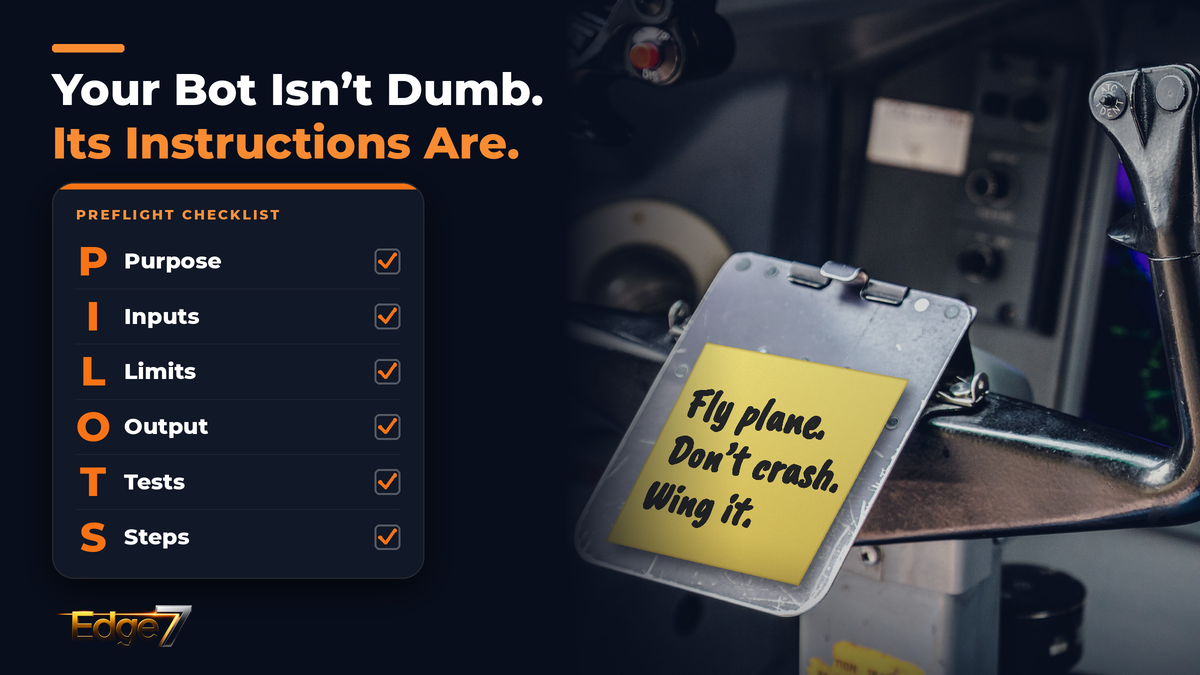
You open the bot builder. There's a big empty box labeled "Instructions," and the cursor just blinks. So you type "Help me with client emails," hit save, and hope.
A week later it has made up a deadline, answered a question nobody asked, and sounded nothing like you. You quietly decide AI isn't ready for your firm.
Here's the thing. The bot did exactly what you told it, which was almost nothing. You handed a brilliant new hire a sticky note and walked away. Nobody shows you what goes in that box, so let's fix that. It takes six parts, and they spell PILOTS.
Why the sticky note fails
The "new hire" picture isn't just mine. Anthropic, the company behind Claude, tells people to treat its model like "a brilliant but new employee who lacks context on your norms and workflows."
Think about what a smart new staff accountant does with a sticky note that says "help with client emails." They guess. Which clients? Which emails? Can they hit send? What does good look like? A bot guesses too, just faster and with more confidence.
A bot's instructions are its job description. PILOTS is a simple way to write one. Each letter is something the sticky note left out.
The PILOTS method
P is for Purpose. What one job does it own, and who is it for?
The sticky note named a topic. A Purpose names an outcome. "Help with client emails" fails. "Check each client's uploaded tax documents against last year's list and draft a missing-items note for staff to review" passes. If you can't say the Purpose in one sentence, the bot isn't ready.
I is for Inputs. What does it start from, and which sources does it trust?
The sticky note didn't say where to look. Name the folders, files, or systems the bot reads. Then say which source wins when two disagree. A bot's memory is handy, but it isn't the source of truth. Your document system is.
L is for Limits. What are the rules, and where must it stop and ask you?
The sticky note never said "don't" or "check with me first." Limits cover both.
First, the standing rules, including the nevers. "Never email a client directly." "Never use a document from another client's folder." Keep the list short. When everything is marked urgent, nothing is.
Second, the stop-and-ask moments. Before it sends, pays, deletes, or publishes anything. When it would hand work to someone else. When it isn't sure. Say plainly that "I don't know" is an acceptable answer. A guess that sounds confident is worse than a question.
O is for Output. What does it hand back, and what does good look like?
The sticky note didn't show what done looks like. Give the format, the length, and the tone. Then paste in one real sample of a good one. An example teaches more than a page of adjectives. "Professional but friendly" means something different to everyone. A sample email doesn't.
T is for Tests. How do you check it before you trust it?
Nobody checked the sticky-note bot until it had already made a mess. You wouldn't give a new hire the keys on day one. Run the bot on two or three real cases where you already know the right answer. Name one person who owns the instructions. Keep a dated copy each time you change them, and test again after any change.
xAI's own guidance for Grok Bot skills covers the same ground: when to use it, the inputs it needs, the order of work, how to check the result, what to return, and what needs approval. It also says to include a policy for missing or stale data.
S is for Steps. What does it do, in order?
The sticky note left the bot to invent its own method. You probably have the steps already. Start from the checklist your staff use, and write it as a short numbered list. Keep it about the work, not every possible exception. Five clear steps beat a page of if-this-then-that.
Example: a tax-season document checklist bot
This is a made-up example to show the method. It is not a client story.
Purpose. For each individual tax client, compare this year's uploaded documents against last year's document list and draft a missing-items note. It serves our tax staff, not clients.
Inputs. The client's current-year portal folder, last year's document list from the prior-year workpapers, and the firm's standard organizer checklist. If last year's list and this year's uploads don't line up (say, a bank account that disappeared), it flags the gap instead of deciding.
Limits.
- Never contact a client. Staff review and send.
- Never move, rename, or delete a file.
- Never give tax advice in the note.
- If a document shows a different taxpayer's name, stop and flag it right away.
- If a document is unreadable or unclear, mark it Unclear. No guessing.
- If last year's list is missing, stop and ask.
Output. A three-column table (Document, Status, Note), plus a draft client note of under 120 words, using the client's first name and plain words. Example row: "1099-INT, Second National Bank | Missing | Received last year, not yet uploaded."
Tests. Run it on three of last year's files where we already know what was missing. The tax manager owns the instructions. Re-test whenever the portal, the organizer, or the instructions change.
Steps.
- Open the client's current-year folder in the portal (read only).
- Pull last year's document list.
- Match each upload to an item on the list.
- Sort every item into Received, Missing, or Unclear.
- Draft the table and the client note for staff review.
Notice where the confidentiality weight sits. It's in Limits. The bot drafts, people send, and anything that looks like it belongs to someone else stops the line.
That's also what a pilot should look like. One small, read-only job, checked by a person, before you hand over anything bigger.
What instructions can't do
Here's the honest part. Instructions advise. They don't enforce.
xAI says it plainly about its own product: "With Grok Bot, the rules are a prompt," and "You are trusting the model to follow what you wrote." Anthropic draws the same line in its coding tool's guide. Written instructions are "advisory," while the tool's built-in checks and permission settings are what actually enforce.
So the sticky note, even a great one, is not a lock. Three things do the enforcing:
- Permissions. If the bot shouldn't touch a folder, don't give it access. Writing "don't look at payroll" is not the same as not connecting payroll.
- Approvals. Keep sending, paying, deleting, and publishing behind an approval step in the app, not just a line in the instructions.
- Tests. The only way to know the bot follows its instructions is to check, and check again after changes.
This is where the CRAM test comes back. CRAM's Rules are PILOTS' Limits. If a new bot's Limits would fight your current bot's, that was CRAM telling you to split. Clock, Access, and Memory are settings around the bot: its schedule, its logins, and what it remembers. PILOTS is what you write.
Signs your definition isn't done
- You can't state the Purpose in one sentence.
- There's no sample of good output.
- Nothing says when to stop and ask.
- It doesn't say what to do when information is missing or out of date.
- It's longer than the job deserves. If you can't tell why a line is there, cut it.
- You've never run it on a real case where you knew the answer.
If any of these sound familiar, you still have a sticky note. You don't need a smarter bot. You need a finished job description.
The PILOTS checklist
Screenshot this.
Throw away the sticky note. Write the job description, and start with one small pilot.
Before you build another bot, CRAM it. Once you decide to build it, write its PILOTS. And if you'd like a second set of eyes on your bot's instructions, that's the work I do at Edge7. You can find me at edge7consulting.com.
Questions or pushback? scott@edge7consulting.com
Start a conversation →