
In AI, a lot can change in a month! Here's what matters.
By Scott Vradenburg
One month. Ten releases. Grok Bot went from your assistant to your team's.
Between Oct 22 and Nov 11, SpaceXSI shipped ten Grok Bot updates. The last one, on Nov 11, was Grok Bot 1.0.
If you run a three-to-ten person firm, here's what matters. You can now set up one bot that the whole office shares. It can sit in on your calls. And you stay in control of what it learns and where it signs in.
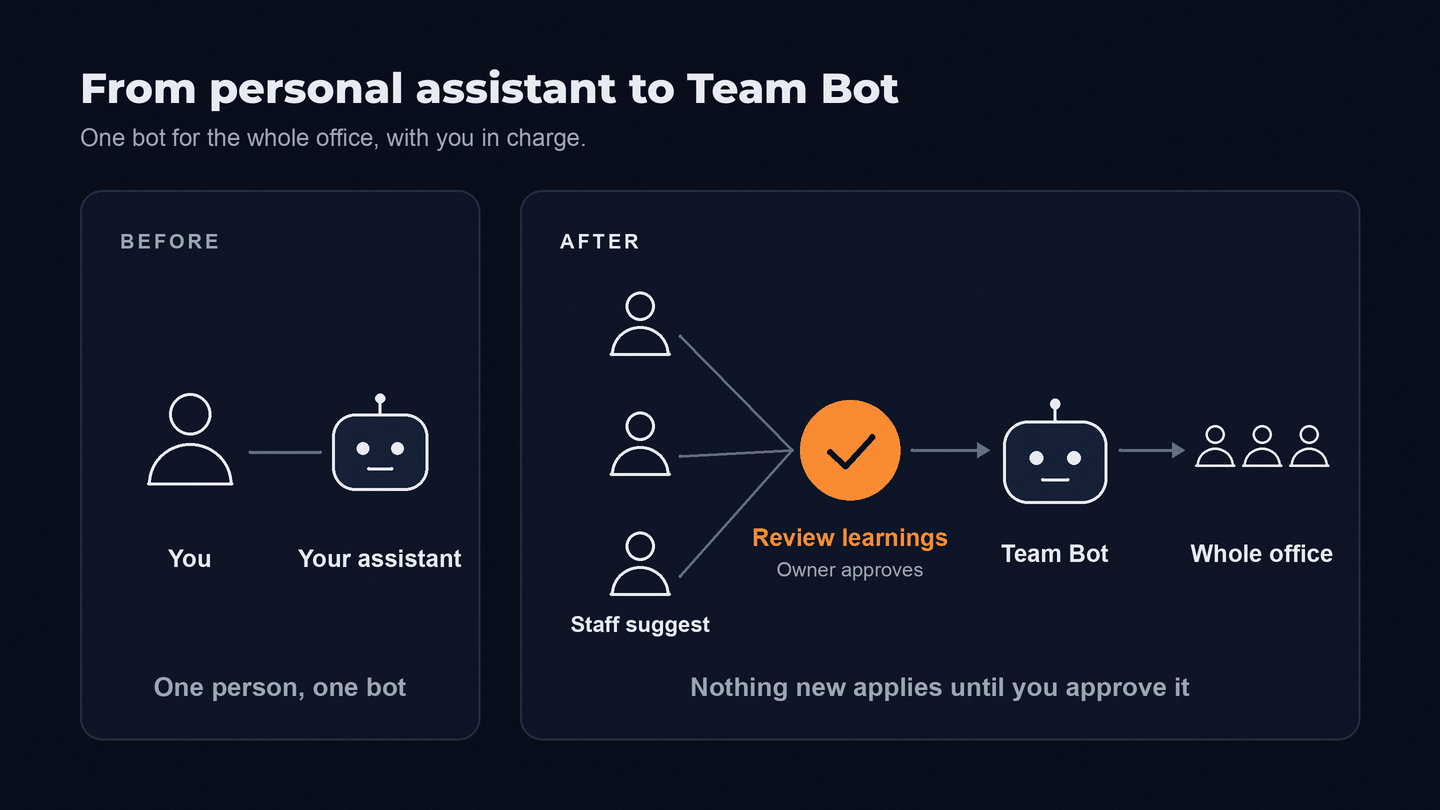
Why it matters: until now, an AI assistant was a personal tool. One person, one bot, one set of habits. A shared bot is closer to a new hire. That means it needs the same things a new hire needs: a manager, clear procedures and limits.
I run my own business on Grok Bots every day, so I've watched these changes land one by one. Here's what's new and what I'd actually do with it.
1. One bot for the whole office, with you in charge
A Team Bot is one bot your staff all use, in the Grok Bot app, in Slack or now in Microsoft Teams. That last one is a big deal, because most of the small firms I talk to run on Microsoft 365, not Slack.
This month added the controls an owner needs:
- A share list. Only the people you share it with can use it.
- "Only you" mode, so you can build and test it before anyone else sees it.
- Review learnings. When a staff member teaches the bot a new procedure, it waits for you (or a Manager) to approve it before it applies to everyone.
- Admin sharing limits, so not everyone can hand the bot out.
That Review learnings piece is the difference-maker. One person can't quietly teach the bot the wrong way to do something and have it spread across the firm.
2. A note-taker on client calls
This is the headline feature of 1.0. On Team, Enterprise and Ultra plans, you paste a Google Meet, Zoom or Microsoft Teams link, approve it, and the host lets the bot in.
What your client sees: the bot joins with a label saying it's transcribing. It only speaks when someone addresses it by name in the meeting chat. Or you can turn off interactivity entirely and it just listens and takes notes.
After the call, you get a summary and action items.
Picture Q4 planning season. Every planning call ends with a one-page summary and a follow-up email draft waiting for the partner to review and send. Nobody spends their evening rebuilding notes.
My advice: prep it like a moderator. Before the call, give the bot the agenda, your goals, the outcomes you expect and the decisions you must walk out with. In my experience, a bot prepped that way can act as an expert moderator. It knows what the meeting is for, so you can ask it in the chat what's still open, and it keeps the must-ask questions from slipping through before everyone hangs up. That's how I use it, not a feature SpaceXSI advertises, so try it on an internal call first.
One caution: the bot announces itself, but that doesn't settle recording consent. Tell your clients ahead of time that a note-taker will be on the call, and check the rules that apply to you.
3. Signing in without sharing passwords
The question I hear most is "how does the bot log in to things without me handing it my passwords?" This month gave a real answer.
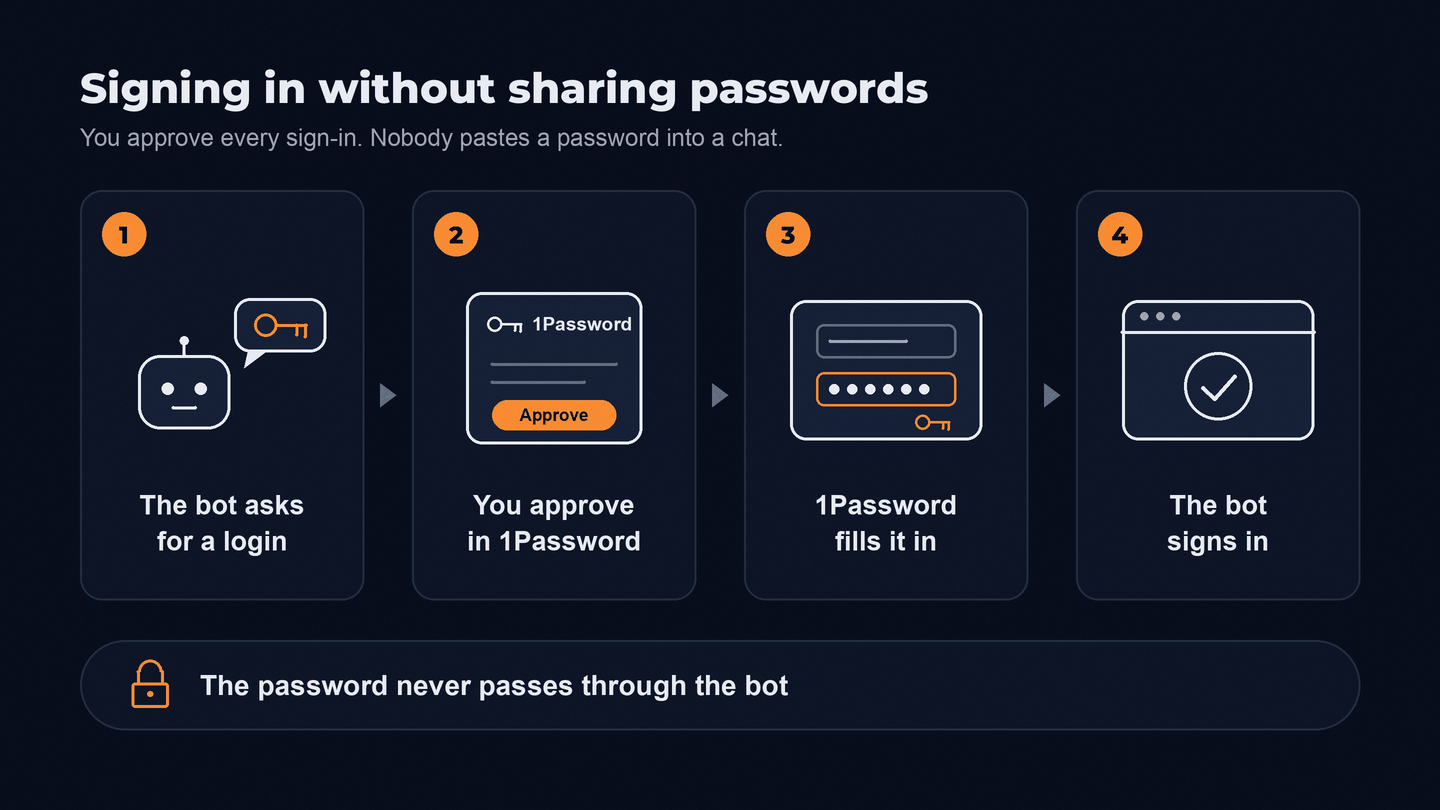
- 1Password: the bot asks for a login, you approve it in 1Password, and 1Password fills it in. The bot never sees the password. If your firm is on a business 1Password plan, confirm it's supported before you count on it.
- Vault: the bot can store logins and fill them in, and managers can give a Team Bot its own logins for the team.
- Clearer approvals: there's now a Permissions list of what the bot is allowed to do without asking. A "no" stays a no; it doesn't keep asking. And if a web page hides instructions meant to trick an AI, the bot now tells you it found them and didn't follow them.
Think January: the bot signs in to your bank and vendor portals, pulls year-end statements and files them. You approve each sign-in. Nobody pastes a password into a chat.
4. The plumbing that makes intake work
The quieter updates are what make daily work possible:
- Scheduled routines can read the bot's own inbox.
- It can forward an email with the formatting and attachments intact.
- Email drafts can carry attachments, and Send includes them.
- It can set up several calendar events in one step.
And emails the bot writes on a schedule still wait as drafts for a person to send.
Put together: give clients one address for year-end paperwork. The bot logs each document against that client's checklist and drafts a forward to the preparer. Hand it a list of 20 clients and it drafts the planning-meeting invites in one pass.
5. The honest part
Three things to know before you jump in.
- Usage is tighter. Around Nov 1, users started hitting weekly limits early, and Elon Musk said on X that the cost of serving Grok Bot was "unsustainably high relative to revenue." No new limits have been published. Plan your usage as part of any pilot, not after.
- Team features need team plans. Team Bots need a Team or Enterprise plan. Meetings need Team, Enterprise or Ultra. A basic plan won't get you there.
- A person still signs off. Some of what SpaceXSI says, like bots that learn from everyone, is the company's own description. I haven't tested it, so treat it as a promise to check, not a result. Keep a human on every send, every payment and every client-facing answer.
6. A 30-day pilot I'd actually run
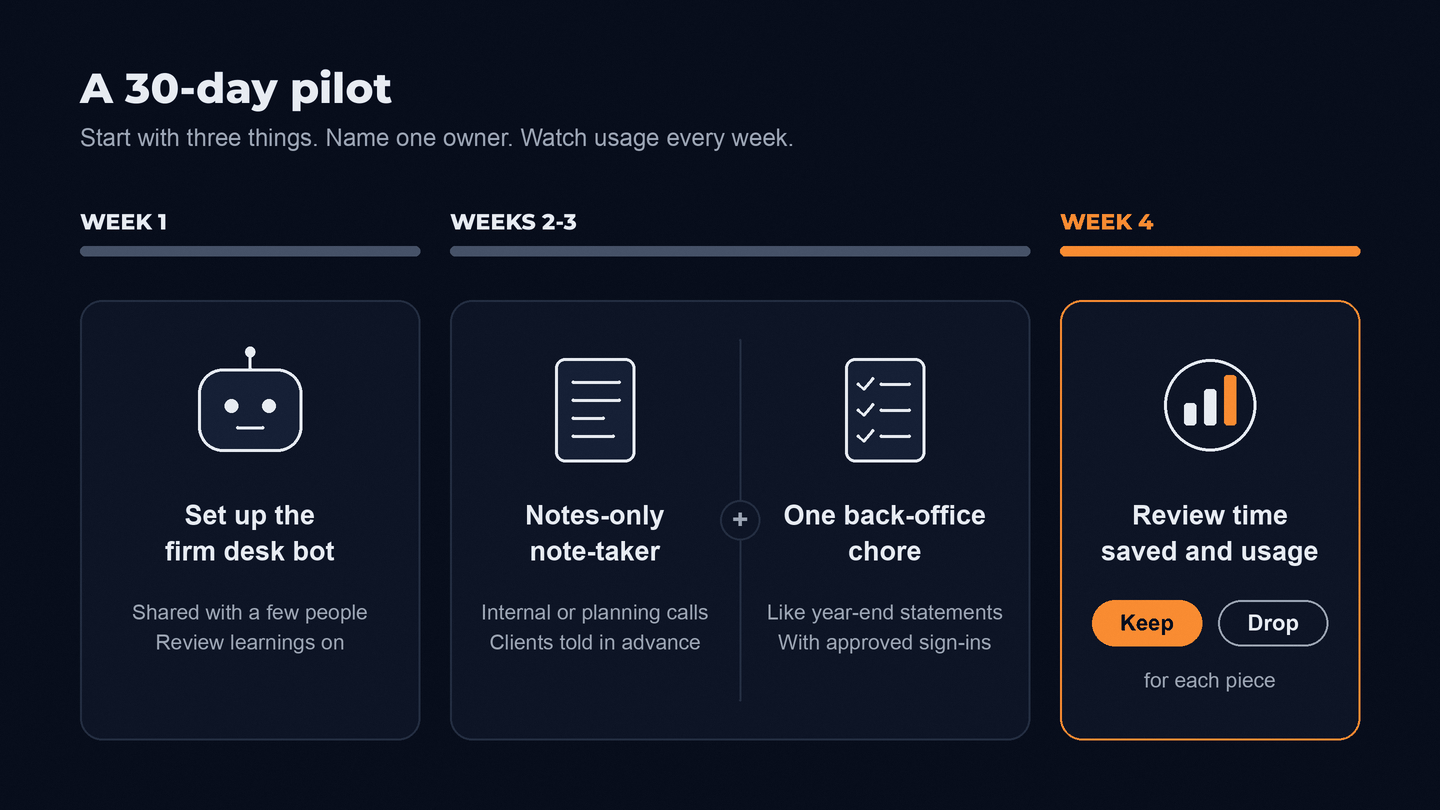
Don't turn everything on. Start with three things:
- A firm desk Team Bot, shared with the few people who need it, loaded with your real checklists, with Review learnings turned on.
- A notes-only note-taker on internal or planning calls, with clients told in advance.
- One back-office chore, like the year-end statement pull or a sweep of every software subscription on the firm card, with approved sign-ins.
Name one owner. Watch usage every week. At day 30, keep what saved time and drop what didn't.
Where Edge7 comes in
This is the work I do as a fractional Head of AI Adoption: set up the Team Bot, turn your procedures into steps the bot follows, and tune usage so the bill doesn't surprise you.
Would it be crazy to spend 20 minutes figuring out whether a pilot makes sense for your firm before tax season? Reply or reach out at Edge7 Consulting.
Sources: Grok Bot changelog (x.ai/changelog/bot), Grok Bot 1.0 announcement, Grok Bot meetings help page, 1Password's Oct 22 announcement, TechCrunch (Nov 2).
Questions or pushback? scott@edge7consulting.com
Start a conversation →